WordPress搭建指南
-
更新软件
sudo apt update -
安装mysql
- 安装mysql服务器
sudo apt install mysql-server - 新建用户
CREATE USER 'test'@'localhost' IDENTIFIED BY 'password'; GRANT ALL PRIVILEGES ON *.* TO 'test'@'localhost' WITH GRANT OPTION; CREATE USER 'test'@'%' IDENTIFIED BY 'password'; GRANT ALL PRIVILEGES ON *.* TO 'test'@'%' WITH GRANT OPTION; FLUSH PRIVILEGES; -
修改bind-address
vim /etc/mysql/mysql.conf.d/mysqld.cnf #修改为0.0.0.0 bind-address = 0.0.0.0 sudo service mysql restart sudo ss -tap | grep mysql - 新建数据库
CREATE DATABASE wordpress DEFAULT CHARACTER SET utf8 COLLATE utf8_unicode_ci;
- 安装mysql服务器
-
安装NGINX
sudo apt install nginx修改nginx配置文件
server {
    listen 80 default_server;
    listen [::]:80 default_server;

    root /var/www/wordpress;

    index index.php index.html index.htm index.nginx-debian.html;

    server_name _;

    location / {
        try_files $uri $uri/  /index.php =404;
    }

    location ~ \.php$ {
        fastcgi_pass unix:/var/run/php/php7.4-fpm.sock;
        fastcgi_param SCRIPT_FILENAME $document_root$fastcgi_script_name;
        include fastcgi_params;
        include snippets/fastcgi-php.conf;
    }

    location ~ /\.ht {
        access_log off;
        log_not_found off;
    deny all;
    }
}
sudo nginx -t sudo systemctl reload nginx -
安装PHP
sudo apt install php php-fpm php-mysql sudo apt install php-curl php-gd php-mbstring php-xml php-xmlrpc php-soap php-intl php-zip -
安装WordPress
wget https://cn.wordpress.org/latest-zh_CN.tar.gz tar -zxvf latest-zh_CN.tar.gz #将解压后的文件夹放入 /var/www/wordpress sudo cp wordpress/ /var/www/wordpress -
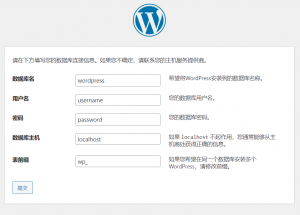
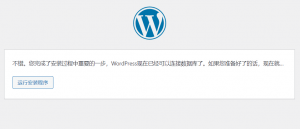
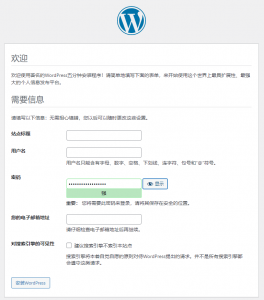
访问页面http://IP/wp-admin/setup-config.php
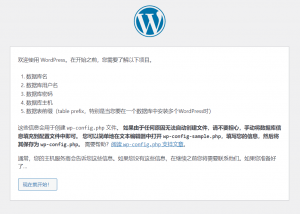
填写数据库连接信息
您好,这是一条评论。若需要审核、编辑或删除评论,请访问仪表盘的评论界面。评论者头像来自 Gravatar。