Django 入门之安装
Django makes it easier to build better web apps more quickly and with less code.
1. What Python version can I use with Django?
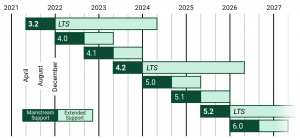
| Django version | Python versions |
|---|---|
| 3.2 | 3.6, 3.7, 3.8, 3.9, 3.10 (added in 3.2.9) |
| 4.0 | 3.8, 3.9, 3.10 |
| 4.1 | 3.8, 3.9, 3.10, 3.11 (added in 4.1.3) |
| 4.2 | 3.8, 3.9, 3.10, 3.11 |
2. Get the latest official version
pip install Django==4.2.33. Creating a project
django-admin startproject mysitemysite/
manage.py
mysite/
__init__.py
settings.py
urls.py
asgi.py
wsgi.pyThese files are:
- The outer mysite/ root directory is a container for your project. Its name doesn’t matter to Django; you can rename it to anything you like.
- manage.py: A command-line utility that lets you interact with this Django project in various ways. You can read all the details about manage.py in django-admin and manage.py.
- The inner mysite/ directory is the actual Python package for your project. Its name is the Python package name you’ll need to use to import anything inside it (e.g. mysite.urls).
- mysite/init.py: An empty file that tells Python that this directory should be considered a Python package. If you’re a Python beginner, read more about packages in the official Python docs.
- mysite/settings.py: Settings/configuration for this Django project. Django settings will tell you all about how settings work.
- mysite/urls.py: The URL declarations for this Django project; a “table of contents” of your Django-powered site. You can read more about URLs in URL dispatcher.
- mysite/asgi.py: An entry-point for ASGI-compatible web servers to serve your project. See How to deploy with ASGI for more details.
- mysite/wsgi.py: An entry-point for WSGI-compatible web servers to serve your project. See How to deploy with WSGI for more details.
4. The development server
$ python manage.py runserver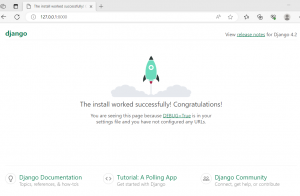
问题
- 安装失败
pip install Django==4.2.3
Collecting Django==4.2.3
Downloading Django-4.2.3-py3-none-any.whl (8.0 MB)
 ----------------------------- ---------- 5.9/8.0 MB 3.5 kB/s eta 0:09:42
ERROR: Exception:
Traceback (most recent call last):
File "E:\software\Python\Python310\lib\site-packages\pip\_vendor\urllib3\response.py", line 438, in _error_catcher
yield
File "E:\software\Python\Python310\lib\site-packages\pip\_vendor\urllib3\response.py", line 561, in read
data = self._fp_read(amt) if not fp_closed else b""
File "E:\software\Python\Python310\lib\site-packages\pip\_vendor\urllib3\response.py", line 527, in _fp_read
return self._fp.read(amt) if amt is not None else self._fp.read()
File "E:\software\Python\Python310\lib\site-packages\pip\_vendor\cachecontrol\filewrapper.py", line 90, in read
data = self.__fp.read(amt)
File "E:\software\Python\Python310\lib\http\client.py", line 465, in read
s = self.fp.read(amt)
File "E:\software\Python\Python310\lib\socket.py", line 705, in readinto
return self._sock.recv_into(b)
File "E:\software\Python\Python310\lib\ssl.py", line 1274, in recv_into
return self.read(nbytes, buffer)
File "E:\software\Python\Python310\lib\ssl.py", line 1130, in read
return self._sslobj.read(len, buffer)
TimeoutError: The read operation timed out
解决方案:
增加国内镜像源即可安装成功pip install Django==4.2.3 -i https://pypi.tuna.tsinghua.edu.cn/simple Looking in indexes: https://pypi.tuna.tsinghua.edu.cn/simple Collecting Django==4.2.3 Downloading https://pypi.tuna.tsinghua.edu.cn/packages/d4/83/227ebf197e413f3599cea96dddc7d6b8ff220310cc5b40dd0f1a15e5a9d1/Django-4.2.3-py3-none-any.whl (8.0 MB) ---------------------------------------- 8.0/8.0 MB 22.2 MB/s eta 0:00:00 Collecting asgiref<4,>=3.6.0 (from Django==4.2.3) Downloading https://pypi.tuna.tsinghua.edu.cn/packages/9b/80/b9051a4a07ad231558fcd8ffc89232711b4e618c15cb7a392a17384bbeef/asgiref-3.7.2-py3-none-any.whl (24 kB) Collecting sqlparse>=0.3.1 (from Django==4.2.3) Downloading https://pypi.tuna.tsinghua.edu.cn/packages/98/5a/66d7c9305baa9f11857f247d4ba761402cea75db6058ff850ed7128957b7/sqlparse-0.4.4-py3-none-any.whl (41 kB) ---------------------------------------- 41.2/41.2 kB ? eta 0:00:00 Requirement already satisfied: tzdata in e:\software\python\python310\lib\site-packages (from Django==4.2.3) (2023.3) Collecting typing-extensions>=4 (from asgiref<4,>=3.6.0->Django==4.2.3) Downloading https://pypi.tuna.tsinghua.edu.cn/packages/ec/6b/63cc3df74987c36fe26157ee12e09e8f9db4de771e0f3404263117e75b95/typing_extensions-4.7.1-py3-none-any.whl (33 kB) Installing collected packages: typing-extensions, sqlparse, asgiref, Django Successfully installed Django-4.2.3 asgiref-3.7.2 sqlparse-0.4.4 typing-extensions-4.7.1